Get told when Claude Code or Codex is waiting for you
An agent that stops on a question prints it and waits. With one terminal in front of you, you see it. With four of them behind an editor, you find out twenty minutes later. Here is every way to be told, for Claude Code and for Codex, on Windows, macOS and Linux, and what changes when several agents run at once.
checked 9 October 2026Claude Code 2.1Codex CLIAgent Moshpit 0.3.0
the short answer/
Three reasons an agent stops, five ways to hear about it
An agent stops because it needs permission to run something, because it asked you a question, or because it finished and is waiting for the next prompt. Both programs can announce all three. Neither does so in every terminal until you set it up.
| Way | Works for | Says which session | Setup |
|---|---|---|---|
| Terminal bell | Claude Code, Codex | No | One setting in each program |
| Notification hook | Claude Code | Only if your command says so | A block in settings.json |
notify program | Codex, when a turn completes | Only if your script says so | A line in config.toml and a script |
| Agent view | Claude Code | Yes | None; a research preview |
| Agent Moshpit | Claude Code, Codex and twelve more CLIs | Yes, by name | Install the app |
claude code/settings.json
Claude Code: the bell, a hook, or agent view
Out of the box, Claude Code sends a desktop notification in three terminals only: Ghostty, Kitty and iTerm2. Anywhere else, Windows Terminal included, nothing happens until you choose one of these.
Ring the terminal's bell
~/.claude/settings.json
{
  "preferredNotifChannel": "terminal_bell"
}
What a bell does is up to the terminal. In Windows Terminal it is a sound by default. Set "bellStyle": "all" on a profile and the taskbar button flashes too, which is the part you notice from another window.
Microsoft lists the choices under bell notification style.
Run a command with a Notification hook
A hook runs any command you like when Claude Code wants you. This one beeps on Windows:
~/.claude/settings.json
{
  "hooks": {
    "Notification": [
      {
        "matcher": "",
        "hooks": [
          {
            "type": "command",
            "command": "powershell.exe -NoProfile -Command \"[console]::beep(880, 300)\""
          }
        ]
      }
    ]
  }
}
Swap the command for your system:
- macOS:
osascript -e 'display notification "Claude Code is waiting" with title "Claude Code"' - Linux:
notify-send "Claude Code" "Waiting for you", which needs a notification daemon running.
Inside the JSON, the double quotes in those commands need a backslash before them. Anthropic's hooks guide has a version for each system; its Windows one opens a dialog box, which the guide warns can come up behind your terminal.
Two timings worth knowing, from the hooks reference. The hook for a permission prompt runs once the prompt has waited about six seconds.
The one for an idle prompt runs about a minute after Claude finished, if you have not typed since. An empty matcher runs the hook for every kind; name a kind, such as permission_prompt, to narrow it.
Or let Claude Code keep the list
claude agents opens agent view, which groups your background sessions under Needs input, Working and Completed, and puts the count of those waiting in the tab's title.
It is a research preview and covers Claude Code only. More about agent view.
codex/config.toml
Codex: the settings under [tui], and notify
Codex has switches of its own.
~/.codex/config.toml
[tui]
notifications = true
notification_method = "bel"notificationsturns Codex's terminal notices on. It can also be limited to the kinds you name; OpenAI's page givesagent-turn-completeandapproval-requestedas examples.notification_methodisauto,osc9orbel.autoprefers a desktop notification where the terminal seems to support one, and falls back to the bell.notification_conditionsays whether they come only when the terminal is not in front, or always.
For anything those cannot do there is notify, which runs a program of yours and hands it one argument, a description of the event in JSON. Put it at the top level of config.toml, before [tui] or any other section:
notify = ["python3", "/home/you/bin/codex-done.py"]
As OpenAI's page stands today, notify is run when a turn completes and not when Codex asks for approval.
For approvals, use the notices under [tui].
several at once/
With several agents, a bell is not enough
A basic bell or generic notification answers “did something stop?”, but leaves you to find the session. A bell is a bell. A notification that says an agent needs your attention does not say which of five tabs to open, unless you write the script that puts the folder's name in it. And two agents that stop a minute apart give you one notification you dismiss and one you never see.
With several agents you want a list that is kept for you: who is waiting, for how long, and a way to go straight there.
one window/Agent Moshpit
A raised hand and a name: what Agent Moshpit does
Agent Moshpit is a free desktop app that runs each agent's real CLI in a terminal pane inside one window, and keeps that list in front of you. Each agent is drawn as a person at a desk. When one stops on a question:
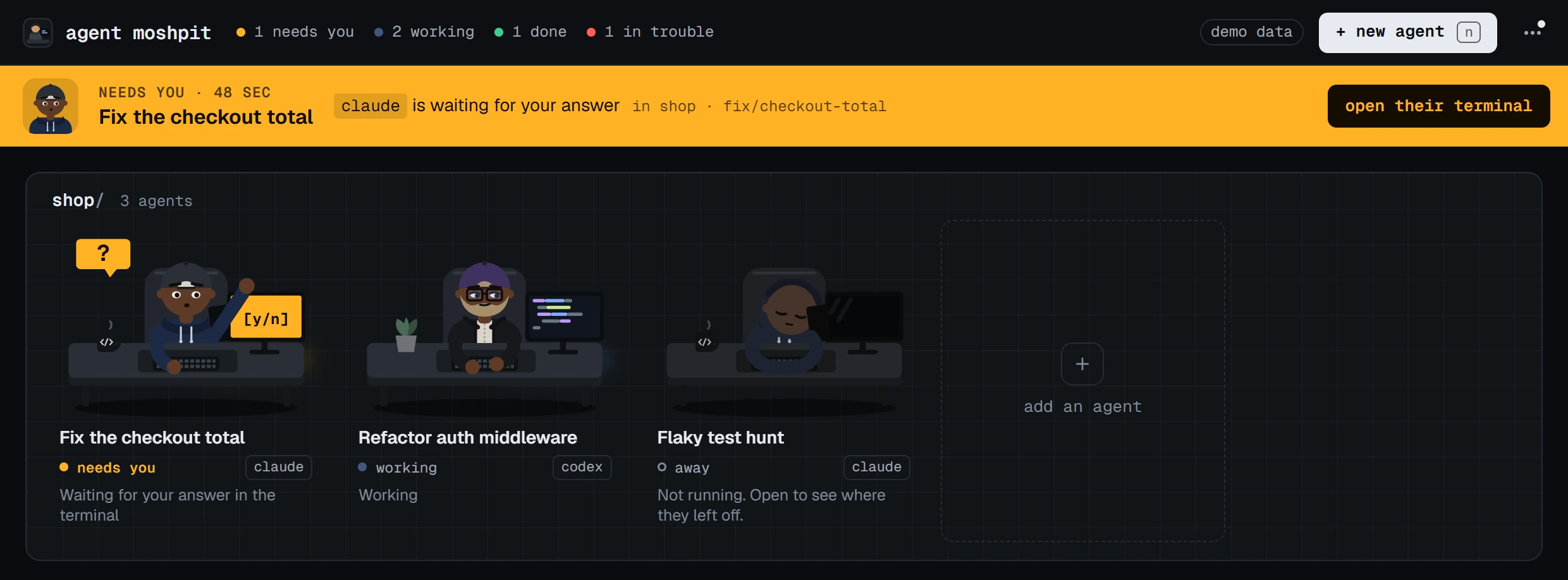
- A hand goes up at their desk, with an amber tag and, when the app knows, a line saying what for.
- A band across the top names whoever has waited longest and has one button, which opens their terminal. Anyone else waiting is listed on the band.
- The top bar counts them, the window's title becomes
Agent Moshpit (2 need you), the taskbar button flashes if the window is behind others, and the tray icon changes. - You get a notification, unless that terminal is already in front of you. On Windows a click on it opens that agent's desk.
- The hand stays up until the question is answered in their terminal. Looking somewhere else does not lower it.
You answer where the program asks. The app draws no approval button of its own: everything under a pane's header is Claude Code's or Codex's own screen. Close the window and the agents keep working from the tray, which goes on showing when one needs you.
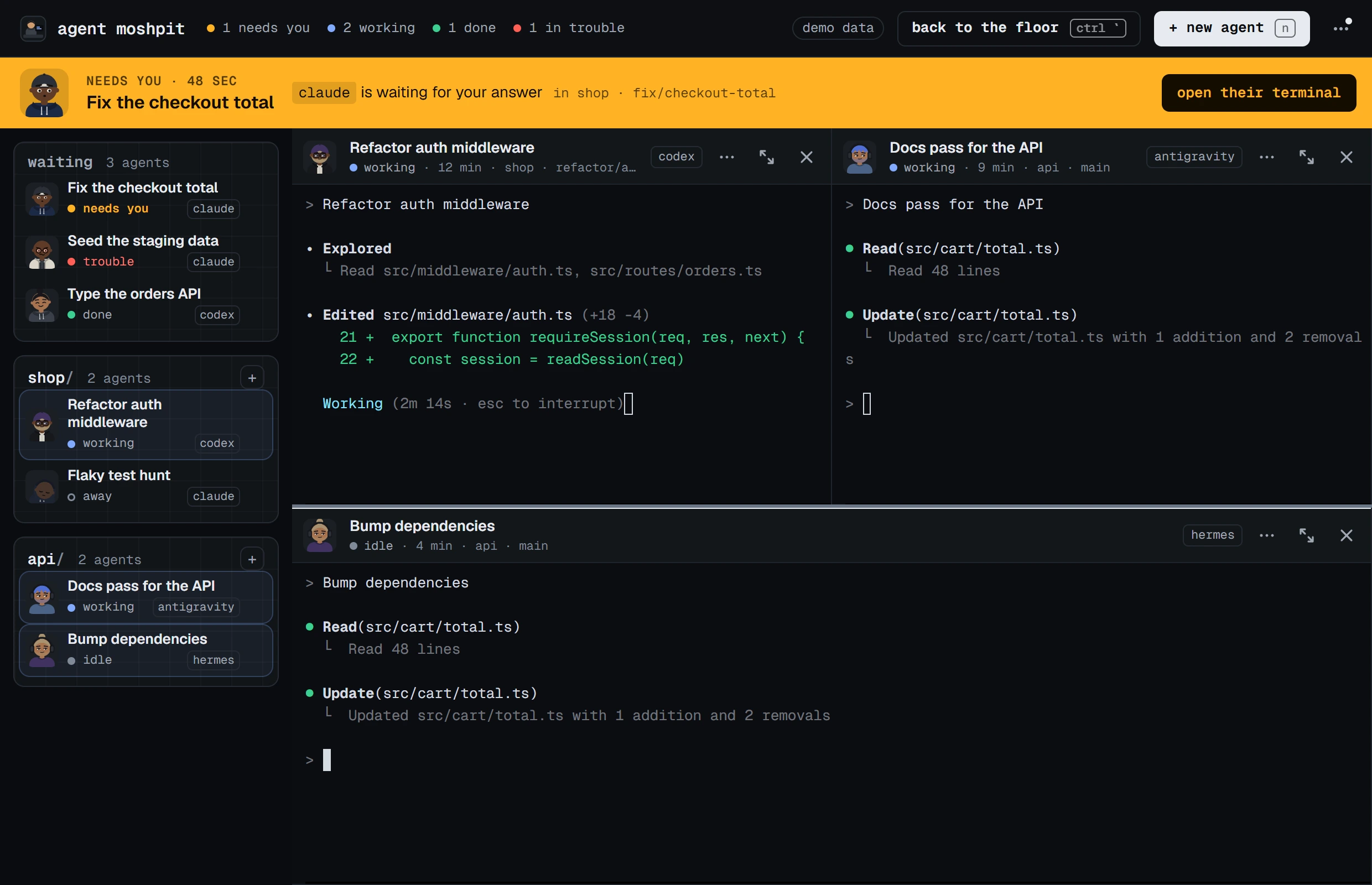
How it knows, without reading the screen
- Claude Code says so itself. It keeps a small file about each running session, and the app reads from it whether Claude is busy, idle or waiting.
- Every other program is read from how its terminal behaves. One that keeps printing is working. One that goes quiet is idle, or done if it had been working. One that rings the bell or sends a terminal notice wants you. Codex is started with its notices turned on for this.
- A folder nobody has trusted yet. Claude Code and Codex first ask whether to trust a folder that is new to them. The app reads their own settings before starting one, and shows “needs you” until you answer.
What is not certain
- For every program but Claude Code, the status is a reading of the terminal and not a report. A program that asks a question without ringing its terminal looks idle or done.
- Two things have not been tried by hand yet: a real click on a Windows notification, and the flash of the taskbar button. A test checks that the notification carries the desk's address and that the address opens the desk.
- On macOS and Linux, a click on a notification does not open that agent's desk yet, and neither build has been used by hand.
- The app makes no sound of its own.
The list of limits has the rest, and the guide to the app describes all of this at length.
asked/
Questions people ask
- Does Claude Code notify me when it needs input?
- By default only in Ghostty, Kitty and iTerm2, where it sends a desktop notification. In any other terminal, set
preferredNotifChanneltoterminal_bellor add a Notification hook. - How do I get Claude Code notifications on Windows?
- Turn on the terminal bell in Claude Code's settings and set
bellStyletoallin Windows Terminal so the taskbar button flashes, or add a Notification hook that runs a PowerShell command. Or run the agents in Agent Moshpit, which sends a Windows notification that names the agent. - How can I make Codex play a sound when it is done?
- In
~/.codex/config.toml, under[tui], setnotifications = trueandnotification_method = "bel", and let your terminal sound its bell. For a sound of your own, pointnotifyat a script. - Why do I get no notifications from Claude Code inside tmux?
- tmux holds them back unless
allow-passthroughis on. Addset -g allow-passthrough onto~/.tmux.confand reload it. Anthropic's terminal guide has the full lines. - How do I know which Claude Code session is waiting?
- From Claude Code itself, run
claude agents: it lists background sessions under Needs input. Across Claude Code, Codex and other CLIs, the band at the top of Agent Moshpit names whoever has waited longest and opens their terminal.
guides/read next
Read next
- How to run multiple Claude Code agents at onceFive ways, from more terminal tabs to one window made for it.
- Claude Code and Codex side by side in one windowBoth at once in the same project, without stepping on each other.
- Several coding agents on Windows, without tmux or WSLWhat runs natively, what needs WSL, and what to use instead.
download/free, MIT
Get Agent Moshpit
Free and open source, with no account to make. It runs the claude and codex you already have, with your own sign-ins.
Used every day on Windows 11. The macOS and Linux builds pass the same automated checks and have not been used by hand yet. Every download, and what each system asks the first time.