How to run multiple Claude Code agents at once
You can run as many Claude Code sessions as you like: every claude you start is a conversation of its own.
Two things get hard as the number grows. Their edits collide when they share a checkout, and you stop noticing which one has stopped to ask you something.
Here are five ways to do it, from nothing to install to a window made for the job.
checked 9 October 2026Claude Code 2.1Agent Moshpit 0.3.0
the short answer/
Yes, and what runs out first is your attention
- Each
claudeprocess is independent: its own conversation, its own permissions, its own folder. - Sessions on one plan share its usage. Anthropic says of background sessions that ten in parallel use quota roughly ten times as fast as one.
- Two sessions writing in the same checkout can overwrite each other. Give each a git worktree.
- None of that tells you which agent is waiting for an answer. The last two ways below do.
| Way | To install | Keeps edits apart | Shows who is waiting | Other CLIs |
|---|---|---|---|---|
| More terminal tabs | Nothing | Only if each has its own folder | No | Any |
claude --worktree | Nothing | Yes | No | Claude Code's own flag |
Agent view, claude agents | Nothing; a research preview | Yes, a worktree for each background session | Yes, a “Needs input” group | Claude Code only |
| tmux | tmux; on Windows, WSL too | No | Not unless you wire it up | Any |
| Agent Moshpit | The app | Yes, when you tick “Work on a separate copy” | Yes: a raised hand, a band naming the agent, a notification | Fourteen, and your own |
by hand/nothing to install
Open more terminals, and give each agent its own worktree
The plain way needs nothing new. Open a terminal tab for each task, go to the project and run claude.
For two agents in two different projects that is all there is to it.
For two agents in the same project, start each in a worktree of its own, so that one cannot overwrite what the other is writing. Claude Code has a flag for it:
claude --worktree fix-checkout
claude --worktree type-orders-api     # in a second terminal
A git worktree is a second checkout of the same repository, on a branch of its own. Claude Code makes it and starts the session inside it, so the two agents never touch the same files on disk.
The repository needs at least one commit. Anthropic's pages on
parallel sessions and
worktrees cover cleaning up afterwards and copying files such as .env into a new one.
Where this stops working: past three or four tabs they all look alike. One of them printed a permission prompt ten minutes ago and has been sitting there since. You find out when you happen to click it.
built in/research preview
Claude Code's own agent view
Claude Code now has a screen for exactly this. Run claude agents and you get one list of your background sessions, grouped under Needs input, Working and Completed.
Type a task to start a new session, press Space on a row to peek at it and reply, and press Enter to step into the full conversation.
A session dispatched from here moves into a worktree of its own before it edits a file.
claude agentsIf Claude Code is the only agent you run, start here: it is already installed. Its limits, as Anthropic's page gives them:
- It is a research preview, and its interface and keys may change.
- It lists background sessions. A
claudeyou have open in another tab does not appear until you send it to the background. - It is for Claude Code. A Codex or Gemini session has no row in it.
The Claude desktop app does a similar job in an interface of its own: its Code tab keeps a sidebar of sessions, shows two side by side, and sends a notification when one finishes. There you work in Claude's chat view, not in the terminal program.
tmux/macOS, Linux, WSL
tmux, or another terminal multiplexer
tmux gives every agent a pane in one terminal and keeps them all running when you close it. Plenty of people run a wall of Claude Code panes this way. Two things to know before you do.
Inside tmux, Claude Code's notifications never reach your terminal unless you let them through. Anthropic's terminal guide gives the lines:
~/.tmux.conf
set -g allow-passthrough on
set -s extended-keys on
set -as terminal-features 'xterm*:extkeys'
And tmux does not run on Windows outside WSL. If that is where you work, see several coding agents on Windows, without tmux or WSL.
A multiplexer shows you every pane. It does not say which of them wants you: you watch for it, or you set up a bell. How to get told when Claude Code or Codex is waiting goes through the ways.
one window/Agent Moshpit
One window that shows who needs you
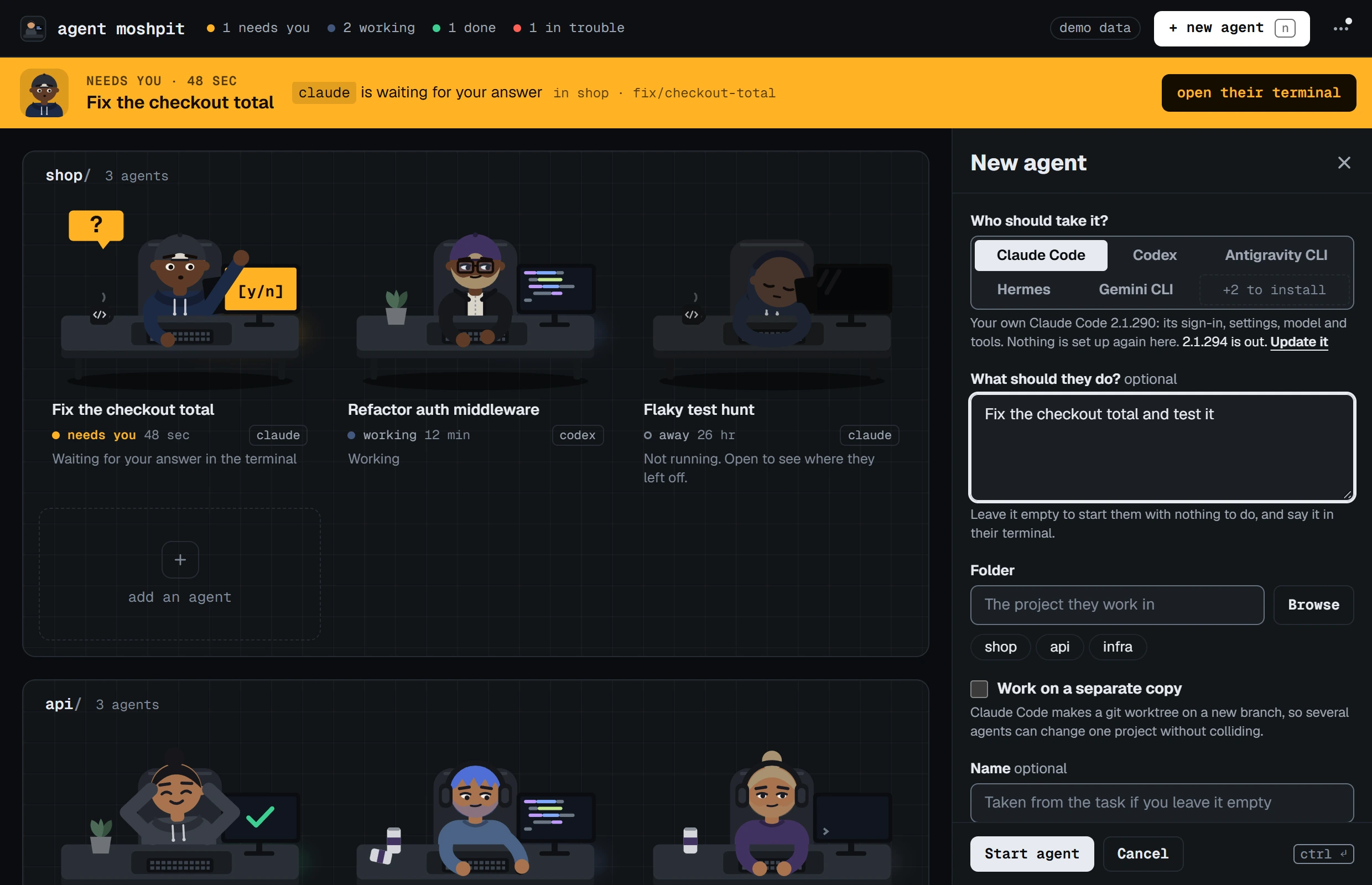
Agent Moshpit is a free desktop app made for this. It starts the claude you already have, as many times as you ask, and gives each one a terminal pane inside a single window.
What it adds is the floor: every agent is drawn as a person at a desk, with a word beside them saying whether they are working, done, idle, or waiting for you.
- Install it and open it. It finds the agent CLIs on your computer.
- Press + new agent, or n. Pick Claude Code, choose the project's folder, and type the task if you like.
- If several agents will change the same project, tick Work on a separate copy. Claude Code is then started with its own
--worktreeflag and makes a worktree for that agent. - Press Ctrl+Enter to start. Do the same for the next agent: the program and the tick box are remembered, because people start several alike.
- Click a desk to see that agent's terminal. Hold Ctrl and click another to open it beside the first; more of them make a grid.
- When a hand goes up, a band across the top names the agent. Press open their terminal and answer there.
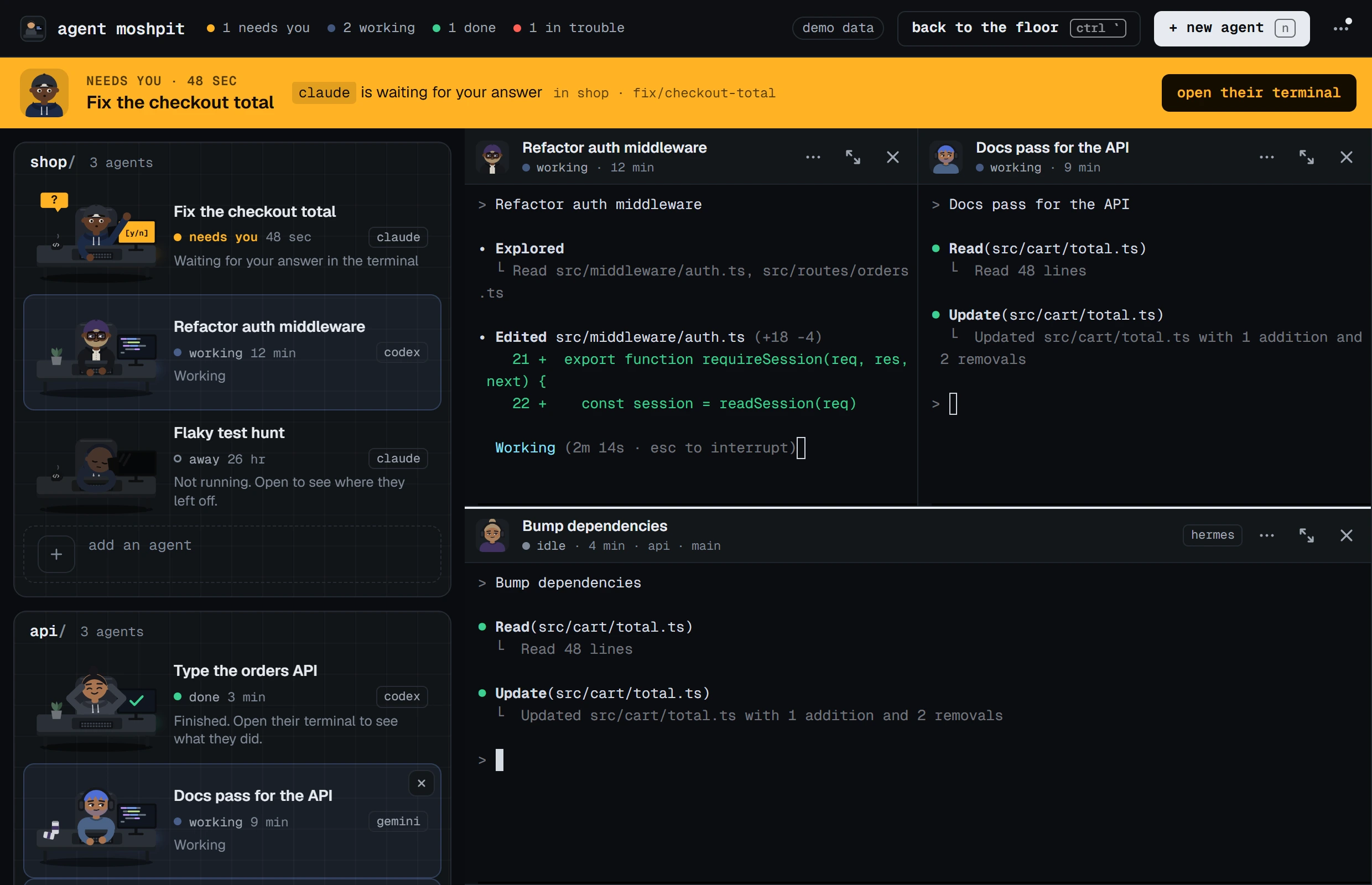
The terminal is the real thing: Claude Code's own prompt, slash commands and approvals, with your sign-in and your settings. The app draws none of the conversation and keeps no API key. Close the window and the agents keep working from the tray.
What it does not do
- It shows the agents you start from it. A
clauderunning in some other terminal does not appear. - A desk says that an agent is working, not what on.
- It merges nothing and shows no diffs. That stays with git and with the CLI.
- “Work on a separate copy” hands the program its own flag. It has not yet been run end to end by hand.
- It is used by hand on Windows 11 only. The macOS and Linux builds pass the automated checks and are otherwise untried.
Every known gap is in the list of limits, and the guide to the app has every key.
asked/
Questions people ask
- Can I run multiple Claude Code instances at once?
- Yes. Every
claudeyou start is a separate process with its own conversation. Open another terminal and run it again, or runclaude agentsand dispatch sessions from one screen. - How many Claude Code sessions can I run at once?
- As many as your plan's usage and your attention allow. Anthropic's notes on agent view say ten sessions in parallel use quota roughly ten times as fast as one.
- Will parallel Claude Code sessions overwrite each other's changes?
- In the same checkout they can. Start each one in a git worktree of its own with
claude --worktreeand a name, or tick Work on a separate copy in Agent Moshpit. - Can two Claude Code sessions talk to each other?
- Not by themselves. Anthropic documents agent teams, an experimental feature that is off by default, for sessions that share tasks and message each other. Agent Moshpit does not connect agents to each other; it shows them to you.
- Can I run multiple Claude Code agents on Windows?
- Yes. Claude Code runs natively on Windows, and so does Agent Moshpit, which is used there every day. tmux is the exception: on Windows it needs WSL. More on Windows.
guides/read next
Read next
- Get told when Claude Code or Codex is waiting for youThe bell, the hooks and the settings, on Windows, macOS and Linux.
- Claude Code and Codex side by side in one windowBoth at once in the same project, without stepping on each other.
- Several coding agents on Windows, without tmux or WSLWhat runs natively, what needs WSL, and what to use instead.
download/free, MIT
Get Agent Moshpit
Free and open source, with no account to make. It runs the claude and codex you already have, with your own sign-ins.
Used every day on Windows 11. The macOS and Linux builds pass the same automated checks and have not been used by hand yet. Every download, and what each system asks the first time.