Run Claude Code and Codex side by side in one window
They are two programs with two sign-ins, and nothing stops you running both at once. People do it to have one check the other's work, to give each the jobs it is better at, or to keep going when one runs into its limit. This page is about the mechanics: both on screen, in the same project, without stepping on each other.
checked 9 October 2026Claude Code 2.1Codex CLIAgent Moshpit 0.3.0
the short answer/
Three things to settle
- One set of instructions. Keep the project's rules in
AGENTS.md, so both programs read the same thing. - A checkout each. If both will edit the same repository, give each a git worktree, or one will write over the other.
- Both in view. Two terminals next to each other, and some way to tell which one has stopped to ask you something.
If what you want is for one program to call the other, that is a different job. OpenAI publishes a Codex plugin for Claude Code that lets Claude hand a review or a task to Codex. Nothing on this page needs it.
instructions/AGENTS.md
One instructions file for both
Codex reads AGENTS.md before it does any work. Claude Code's own file is CLAUDE.md. Since version 2.1.277, its default settings also read AGENTS.md when there is no CLAUDE.md or CLAUDE.local.md in the working folder or above it.
One AGENTS.md at the root can therefore work for both. If Claude does not load it, use the import below; Anthropic's troubleshooting steps cover versions and settings that change this.
If the project already has a CLAUDE.md, Claude Code reads that and leaves AGENTS.md alone. Keep the shared rules in AGENTS.md and pull them in with one line:
CLAUDE.md
@AGENTS.md

Anything below this line is for Claude Code alone.
The two makers describe the details: Anthropic on AGENTS.md and OpenAI on AGENTS.md.
apart/git worktree
Keep their edits apart
Two agents in one folder share one set of files. If Claude Code is halfway through a refactor when Codex runs the tests, Codex tests a half-made change, and each can save over the other. A git worktree gives each its own checkout of the same repository on its own branch:
git worktree add ../shop-claude -b claude/checkout-total
git worktree add ../shop-codex  -b codex/auth-middleware
Then start claude in the first folder and codex in the second. When a piece of work is good, merge its branch as you would anyone's.
Claude Code can also make its own with claude --worktree and a name.
Sharing a folder is fine when only one of them writes. A common pairing is one agent making the change and the other reading the diff and saying what it thinks.
one window/Agent Moshpit
Both terminals in one window
Two terminal tabs do the job. What they do not do is tell you, while you are reading one, that the other has been waiting four minutes for a yes.
Agent Moshpit is a free desktop app that runs the claude and the codex you already have in terminal panes inside one window, and shows each as a person at a desk with a status beside them.
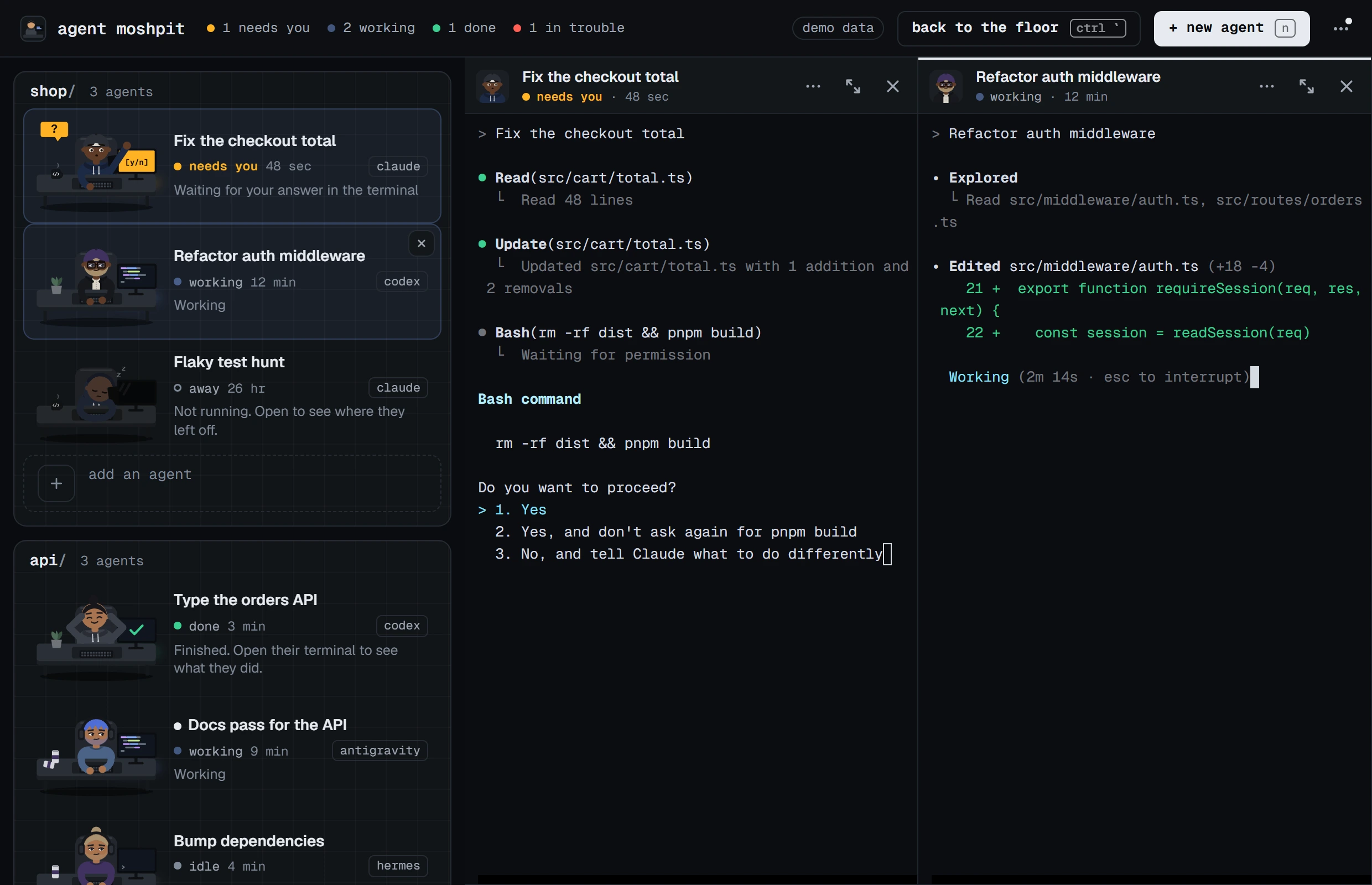
- Install it. It finds the CLIs on your computer; both must already be signed in the way their makers describe.
- Press + new agent, or n. Choose Claude Code, the folder, and a task if you like. Tick Work on a separate copy if both will edit the same repository.
- Do it again and choose Codex.
- Click the first desk to open its terminal. Hold Ctrl and click the second to open it beside the first.
- Drag the edge between the panes to give one more room, or press Ctrl+Shift+Enter to give one pane the whole space for a while.
Both panes are the real programs: Claude Code's prompt and slash commands in one, Codex's in the other, each with its own sign-in, model and settings. The app keeps no API key and draws none of either conversation. Each pane's header carries the agent's name, its status, the project and branch, and which program it is.
The same goes for the other CLIs it knows: Antigravity CLI, Hermes, Gemini CLI, OpenCode and eight more can sit at the next desk, and you can add your own with a few lines of JSON.
What to expect
- Status is read differently for each. Claude Code reports whether it is busy, idle or waiting. Codex is read from how its terminal behaves, with its notices turned on, so a question it asks without a notice can look idle. How the app knows who is waiting.
- After a restart every desk is back, asleep, and nothing starts until you ask. Carry on resumes Claude Code's conversation, and Codex's once the app has read which session it began.
- “Work on a separate copy” asks the program to make its own worktree, where the program can. It has not been run end to end by hand yet. Making the worktrees yourself, as above, always works.
- The app does not pass messages between the two, compare their answers or merge their branches.
- It is used by hand on Windows 11 only. The macOS and Linux builds pass the automated checks and are otherwise untried.
The list of limits has the rest.
asked/
Questions people ask
- Can I use Codex and Claude Code at the same time?
- Yes. They are separate programs with separate sign-ins, and nothing stops you running both. Give each a terminal, and a git worktree of its own if both will change the same project.
- Is Codex the same as Claude Code?
- No. Codex is OpenAI's coding agent and Claude Code is Anthropic's. Each has its own command, its own sign-in and plan, and its own settings.
- How do I get Claude Code and Codex to talk to each other?
- That is a different job from running them side by side. OpenAI publishes a Codex plugin for Claude Code that lets Claude hand a review or a task to Codex. Agent Moshpit does not connect agents to each other; it shows both to you.
- Can Claude Code and Codex share one instructions file?
- Yes. Codex reads
AGENTS.md. Claude Code readsAGENTS.mdtoo when the project has noCLAUDE.md; if it has one, importAGENTS.mdfrom it. - Do I need two subscriptions?
- Each program needs its own sign-in, set up the way its maker describes. Agent Moshpit adds no account, no API key and no charge of its own.
guides/read next
Read next
- Get told when Claude Code or Codex is waiting for youThe bell, the hooks and the settings, on Windows, macOS and Linux.
- How to run multiple Claude Code agents at onceFive ways, from more terminal tabs to one window made for it.
- Several coding agents on Windows, without tmux or WSLWhat runs natively, what needs WSL, and what to use instead.
download/free, MIT
Get Agent Moshpit
Free and open source, with no account to make. It runs the claude and codex you already have, with your own sign-ins.
Used every day on Windows 11. The macOS and Linux builds pass the same automated checks and have not been used by hand yet. Every download, and what each system asks the first time.