Windows
Windows 11, 64-bit. Windows 10 is untried.
The first time: Windows says it protected your PC. Choose More info, then Run anyway.
Or in PowerShell, which asks nothing:
irm https://agentmoshpit.com/install.ps1 | iexClaude Code, Codex, Antigravity CLI and the rest run as the real programs, each in a terminal of its own inside one window. Each is drawn as a person at a desk, so one look tells you who is working, who is done, and who has a hand up because they need you.

 needs you
A hand up. It has stopped on a question only you can answer.
needs you
A hand up. It has stopped on a question only you can answer.
 working
Typing, with code on the screen.
working
Typing, with code on the screen.
 done
Leaning back. It finished something you have not looked at yet.
done
Leaning back. It finished something you have not looked at yet.
 idle
Sitting at a prompt, with nothing to do.
idle
Sitting at a prompt, with nothing to do.
 trouble
Hands on their head. The program stopped with an error.
trouble
Hands on their head. The program stopped with an error.
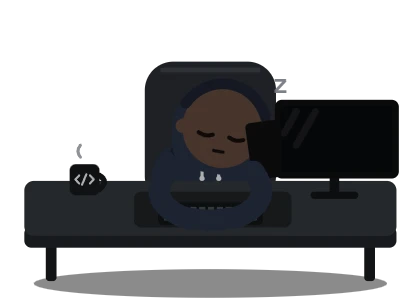 away
Asleep. Not running; the desk keeps where they left off.
away
Asleep. Not running; the desk keeps where they left off.
Click a desk and their terminal opens beside the floor. Everything under a pane's header is the program's own screen: its prompt, its slash commands, its approvals. The office draws none of it. You answer a question where the program asks it.
Open as many as you like, side by side or in a grid. Close the window and the agents keep working; the tray icon and a notification tell you when one needs you.

claude, codex or agy you already have, the way your terminal does. It keeps no API key and no model setting.Windows 11, 64-bit. Windows 10 is untried.
The first time: Windows says it protected your PC. Choose More info, then Run anyway.
Or in PowerShell, which asks nothing:
irm https://agentmoshpit.com/install.ps1 | iexmacOS 10.15 or later, Apple Silicon or Intel.
Paste this into Terminal:
curl -fsSL https://agentmoshpit.com/install.sh | shIt puts Agent Moshpit in Applications and opens it. The script is short, if you want to read it first.
There is a .dmg too, for Apple Silicon and for Intel. macOS refuses to open an app from one until you allow it under System Settings, Privacy & Security. The command has no such step.
64-bit, with WebKitGTK 4.1.
The first time: an AppImage has to be made runnable: chmod +x the file, then start it.
Or in a terminal, which picks the right one:
curl -fsSL https://agentmoshpit.com/install.sh | shThe app is not signed with a paid certificate yet, which is why Windows asks the first time and why macOS is given a command instead of a file to click. All downloads and the release notes are on GitHub. You also need at least one agent CLI, installed and signed in the way its makers say; the office can install the ones published on npm for you.