Several coding agents on Windows, without tmux or WSL
Many of the tools for running Claude Code and Codex in parallel were made on a Mac, and a good share of the rest lean on tmux, which Windows has only inside WSL. If you searched for cmux, Conductor or Claude Squad on Windows, here is what runs there, what needs WSL and what is not there at all, each from its maker's own page.
checked 9 October 2026Windows 11Agent Moshpit 0.3.0
the short answer/read 9 October 2026
What runs on Windows, and how
Claude Code and Codex themselves both run on Windows without WSL. It is the tools around them that vary.
| Tool | On Windows | What it is |
|---|---|---|
| cmux | No. Its README says macOS only, for now. | A native Mac terminal for agents |
| Conductor | No. Its install page says not for Windows or Linux yet. | A Mac app for running several coding agents |
| Claude Squad | Needs tmux, so on Windows it means WSL | A terminal app built on tmux |
| Agent of Empires | Only through WSL2, says its README | A session manager built on tmux |
| Agent Deck | Through WSL | A session manager built on tmux |
| Windows Terminal | Yes, it is part of Windows 11 | Tabs and split panes. It knows nothing about agents. |
| Claude desktop app | Yes | Anthropic's own app, for Claude sessions |
| ChatGPT desktop app | Yes | OpenAI's own app, for Codex |
| Agent Moshpit | Yes. Used every day on Windows 11. | One window of real CLI terminals, with a floor that shows who is waiting |
windows itself/nothing to install
What Windows already gives you
Anthropic documents a native Windows install of Claude Code, for Windows 10 version 1809 or later, with Git for Windows optional. OpenAI lists the Codex CLI among the ways to use Codex on Windows. Neither needs WSL.
Windows Terminal will hold several of them. Alt+Shift++ splits the pane you are in to the right and Alt+Shift+- splits it downwards; run claude in one and codex in the next.
To hear from a pane you are not looking at, turn on each program's terminal bell and set "bellStyle": "all" in the Terminal profile, so the taskbar button flashes.
The settings for both programs are here.
That gets you a wall of panes. It does not tell you which pane rang, and two agents in the same folder will still write over each other; for that, see a worktree for each agent.
one window/Agent Moshpit
Agent Moshpit on Windows
Agent Moshpit is a free, open-source desktop app, and Windows 11 is where it is used every day.
It starts the claude, codex or other agent CLI you already have, each in a pseudo-terminal of its own under the app, and shows them in panes inside one window.
There is no tmux in it and nothing to set up in WSL.
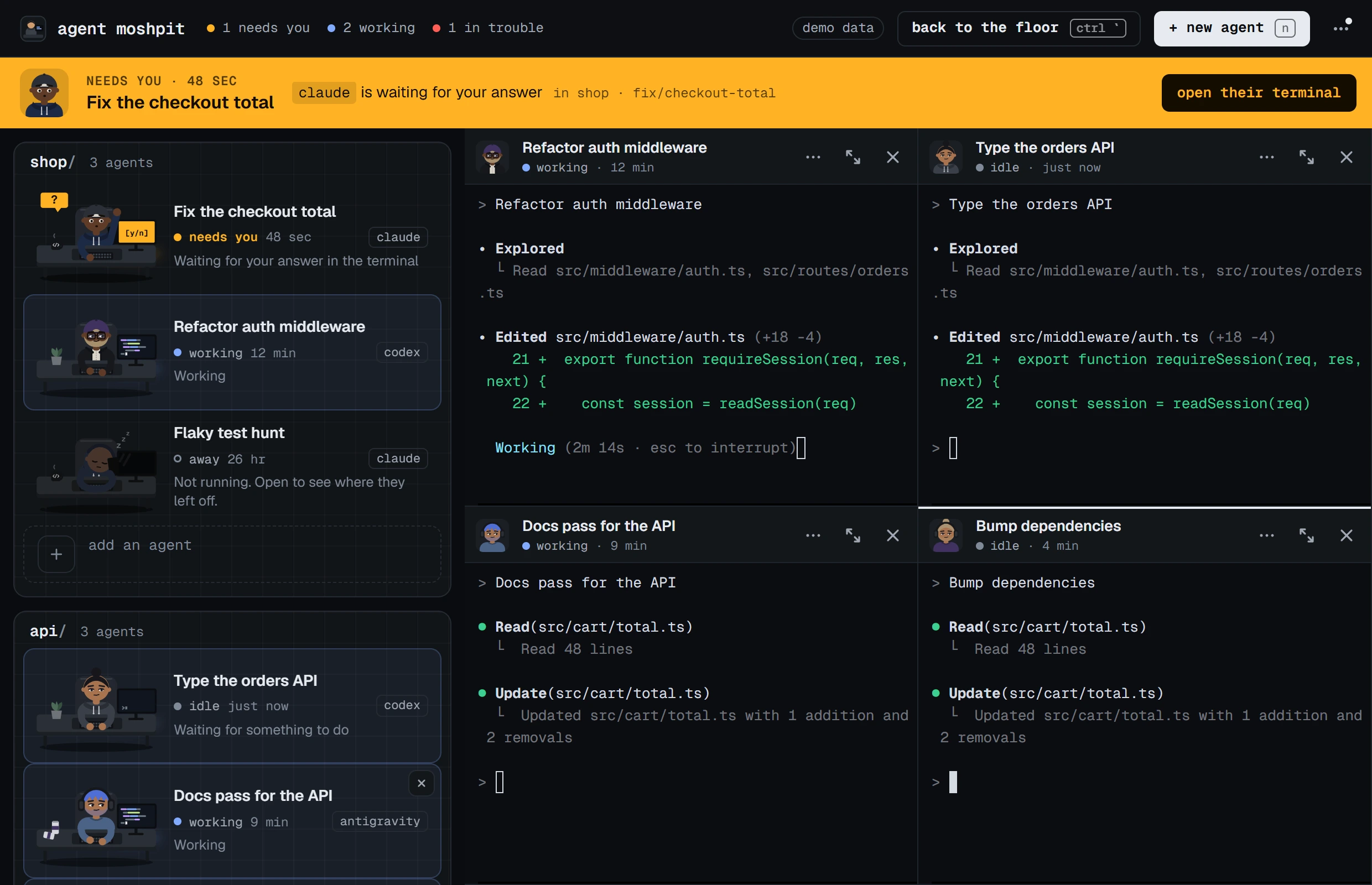
- One button in the taskbar. No CLI opens a window of its own. Each is a process under the app.
- When an agent needs you, a hand goes up at its desk, a band names it, the taskbar button flashes if the window is behind, the tray icon changes, and Windows shows a notification. A click on the notification opens that agent's terminal.
- Close the window and they keep working. The app stays in the tray. Quitting it ends the agents, and asks first if any is busy.
- The keys you know from Windows Terminal. Ctrl+C copies when text is selected, Ctrl+V pastes, files dropped on a pane paste their paths, and Ctrl with a click on a path such as
src/app.ts:42opens it in your editor at that line. - Fourteen CLIs, Claude Code and Codex among them, and your own with a few lines of JSON.
Installing it
Download the installer. The app is not code-signed yet, so the first time Windows says it protected your PC: choose More info, then Run anyway. Or paste this into PowerShell, which asks nothing:
irm https://agentmoshpit.com/install.ps1 | iexThe script is short, if you want to read it first. Windows 10 is untried.
What it is not
- Not a terminal for everything. cmux is a terminal you live in. Agent Moshpit is built around agent CLIs and sits beside the terminal and editor you already use.
- Not a worktree or diff manager. It makes no branches, shows no diffs and merges nothing. Its “Work on a separate copy” box only passes the CLI its own worktree flag, and has not been run end to end by hand yet.
- Not tmux. You cannot detach and come back from another machine. Closing the window keeps the agents; quitting the app ends them.
- Not a place for sessions started elsewhere. It shows the agents you start from it.
Two Windows details are in the list of limits with the rest: a real click on a notification and the taskbar flash have not been tried by hand, and updating a CLI while agents are running it can fail until they stop.
asked/
Questions people ask
- Is there a cmux for Windows?
- No. cmux's own README says it is macOS only for now. On Windows, other tools give each agent a terminal and tell you when one is waiting; Agent Moshpit is one of them and is free.
- Does Conductor run on Windows?
- No. Conductor's install page says it is not available for Windows or Linux yet.
- Does Claude Squad work on Windows?
- Claude Squad needs tmux, and tmux runs on Windows only inside WSL. So it works from a WSL terminal, with your projects and your agent CLIs installed there.
- Do I need WSL to run Claude Code or Codex on Windows?
- No. Anthropic documents a native Windows install of Claude Code, and OpenAI lists the Codex CLI among the ways to use Codex on Windows. Both run in PowerShell.
- Is there something like tmux for Windows?
- tmux itself runs only inside WSL. Windows Terminal has tabs and split panes of its own. For agent CLIs in particular, Agent Moshpit gives each one a pane in one window and shows which is waiting for you.
guides/read next
Read next
- How to run multiple Claude Code agents at onceFive ways, from more terminal tabs to one window made for it.
- Get told when Claude Code or Codex is waiting for youThe bell, the hooks and the settings, on Windows, macOS and Linux.
- Claude Code and Codex side by side in one windowBoth at once in the same project, without stepping on each other.
download/free, MIT
Get Agent Moshpit
Free and open source, with no account to make. It runs the claude and codex you already have, with your own sign-ins.
Used every day on Windows 11. The macOS and Linux builds pass the same automated checks and have not been used by hand yet. Every download, and what each system asks the first time.